Operations
Various Operation Options are located at the top of the main window, including Open, Save, Copy, Auto Layout, Hollow, Dig Hole, Repair, Standard Parts, Resin Material Alliance, Notifications and Account Management.
Open
Open 3D mesh files, .chitubox project files, or slice files.
Save
Save your current project to a .chitubox file or a 3D mesh file.
Copy
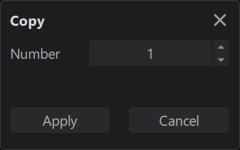
Create multiple copies of a 3D model. This function can be helpful when printing multiple copies of a single model.
Auto Layout
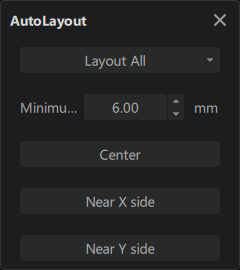
The Auto Layout function gives users multiple options to quickly and easily position 3D models on the print platform, including center of the build plate, near the X side of the build plate, and near the Y side of the build plate.
Hollow
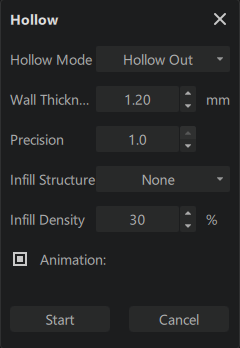
The Hollow function has 2 modes: "Hollow out" and "Peel".
Hollow out allows users to create 3D models with hollow interiors, while retaining the outer shape of the model. The Hollow option can help users save time and material costs when printing 3D models, as the hollow interior will require less material to print. This feature can also be used to create lightweight models with a complex outer shape.
Peel will peel off a designated thickness of wall from the model, just like shrinking the model down.
Hollow Parameters Explained
-
Wall Thickness: wall thickness determines the overall thickness of the walls.
-
Precision: Density of the generated triangles. A value of 0 represents the minimum density, and 1 represents the maximum.
Low PrecisionHigh Precision -
Infill Structure: Pattern of the infill.
-
Infill Density: Density of the infill.
-
Animation: enabling this option will show the hollowing process.
Dig Hole
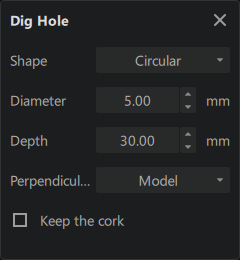
The "Hole" function allows users to create holes of specified shape or size in a 3D model with just a few clicks.
Hole Parameters Explained
-
Shape: The shape of the hole; available shapes are Circular, Hexagon, and Square.
-
Diameter: The diameter of the hole.
-
Depth: The maximum thickness of the wall that the hole can penetrate.
NOTEThis function is designed to penetrate walls of models, so it will not dig a non-penetrate hole as per the depth you set.
-
Perpendicular to: Choose the digging angle: perpendicular to the screen or to the model.
-
Keep the cork: Whether to Keep the hole plug.
Repair
The Repair function will try to fix broken models.
The repair function may not function correctly if the model is complex or has a lot of errors like inverted normals, overlapping faces, etc.
Standard Parts
Standard Parts provides users with a library of pre-made 3D models that can be quickly and easily imported into their project, including a various basic geometries, testing models, tool models, mechanical parts, and more.

Resin Material Alliance
Users can access Material Center here.
Notifications
Users can view notifications from CHITUBOX here.
Login
Users can log in to their CHITUBOX account. After logging in, users can access their settings from the cloud.